In the world of IPTV, you’ll often encounter two main ways to access your service: the M3U playlist and the Xtream Code login. While both get the job done, this API-based method has become preferred for users seeking a more stable, integrated, and user-friendly experience. But what exactly is it, and how do you use it to achieve a flawless streaming setup?
As a team that lives and breathes streaming technology, we’re here to demystify this popular login system. This isn’t just another technical term; it’s a powerful tool that can significantly enhance your viewing experience. In this ultimate guide, we’ll break down what these logins are, how they work, why they’re often superior to an M3U link,
Key Takeaways
For a quick overview, here are the essential points:
What It Is: An Xtream Code isn’t a single “code” but a set of three credentials: a Server/Host URL, a Username, and a Password. It’s a login method that uses an API to connect your player directly to your IPTV provider’s server.
Why It’s Better: Compared to a static M3U link, an Xtream Code login often provides a more dynamic and reliable connection. It automatically updates channel lists, organizes VOD and series content more effectively, and integrates seamlessly with popular IPTV players.
How It Works: You simply enter the three pieces of information into a compatible app (like IPTV Smarters Pro). The app then uses the API to fetch your channel list, Electronic Program Guide (EPG), and VOD library directly from the server.
Provider Quality is Crucial: The Xtream Code is only as good as the service behind it. A stable, high-performance server is the key to a buffer-free experience.
What is an Xtream Code, Really?
An Xtream Code (often called Xtream Codes API) is a popular content management system used by thousands of IPTV providers to manage their services and customers. For the user, it’s a streamlined login method.
Instead of a long, single M3U URL, your provider gives you three simple pieces of information :
Server URL (or Host/Portal URL): The web address of your provider’s server.
Username: Your unique identifier.
Password: Your private key for access.
Think of it like this: an M3U link is like a guest pass to a party, while an Xtream Code is like having your own personal key and invitation. It provides a more direct and secure handshake between your app and the server.
Xtream Code vs. M3U Playlist: What's the Real Difference?
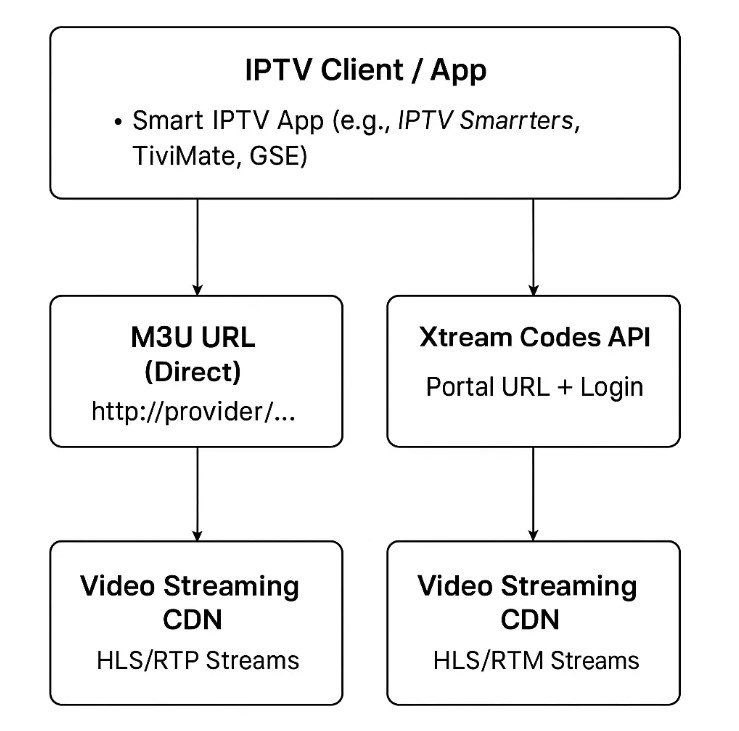
While both methods grant you access to IPTV channels, they function differently, and the Xtream Code API offers several distinct advantages.
| Feature | M3U Playlist | Xtream Code Login |
| Setup | A single, long URL to copy and paste. | Three separate fields: Server URL, Username, Password. |
| Updates | Manual. If the provider adds channels, you may need a new URL. | Automatic. The channel list is fetched from the server upon login. |
| VOD/Series | Can be messy. VOD content is often mixed in with live channels. | Superior organization. VOD and TV Series are typically separated into their own browsable libraries. |
| Integration | Basic. The player just reads a list of links. | Deeper integration. Allows for better EPG loading and a more app-like experience. |
| Reliability | Can be less stable. Some providers are phasing out M3U support. | Generally more stable and the preferred method for most modern IPTV apps. |
Our Recommendation: If your provider offers both options, we almost always recommend using the Xtream Code login for a smoother, more organized, and future-proof setup.
How to Use Your Xtream Code for a Flawless Setup (Step-by-Step)
💡 Don’t have an Xtream Code yet? Get yours now from www.tashan-iptv.com and start streaming instantly!
Using your Xtream Code is incredibly simple with the right app. Here’s a clear, step-by-step guide using the popular IPTV Smarters Pro app as an example:
1. Install a Compatible Player
First, download and install a trusted IPTV player such as IPTV Smarters Pro or TiviMate from an official app store.
2. Open the App and Add User
Launch the app. You will typically see an option like “Add New User” or “Add Your Playlist.”
3. Select “Login with Xtream Codes API”
This is the most important step.
👉 Do not choose “Load Your Playlist or File/URL.”
👉 Instead, select the option specifically for Xtream Codes API.
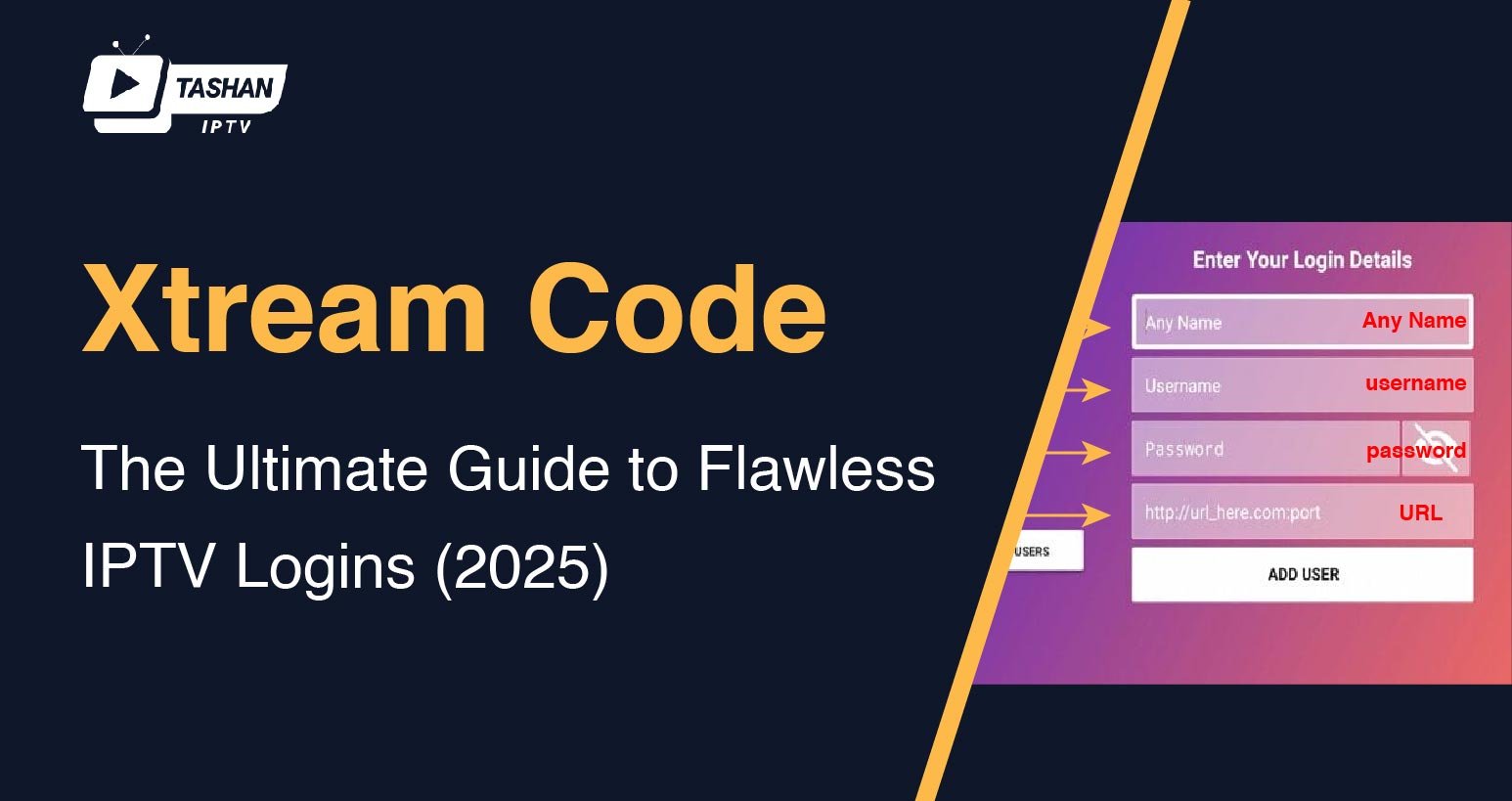
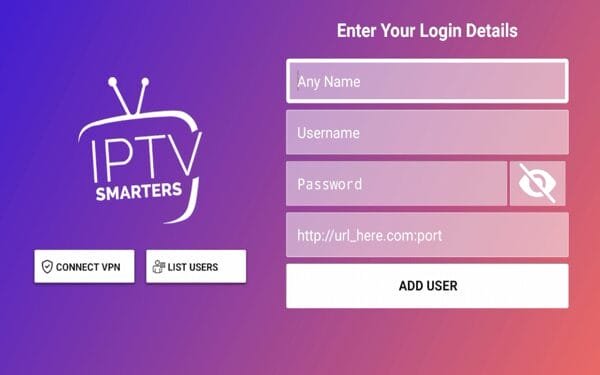
4. Enter Your Credentials
Carefully type in the three pieces of information provided by your IPTV service:
Any Name: Just a name for your playlist (e.g., Tashan TV).
Username: Your exact username.
Password: Your exact password.
Server URL: The server address, including the
http://and port number at the end (e.g.,http://example.com:8080).
5. Add User and Start Streaming
Click “Add User.” The app will authenticate your details and begin downloading the channels, VOD, and EPG. Within a minute, your flawless IPTV streaming experience will begin.
Frequently Asked Questions (FAQ)
1) What exactly is an Xtream Code?
An Xtream Code is not a single code but a set of login credentials provided by your IPTV service. It consists of three parts: a Server/Host URL, a Username, and a Password. It uses an API (Application Programming Interface) to allow your IPTV player to communicate directly with your provider’s server for a more stable connection.
2) IIs this login method legal?
The software platform itself is a legal tool for managing content. However, the legality of using a specific service depends on whether that provider has the legal rights to distribute the channels they offer. If they operate without licenses, then streaming from them is illegal.
3) Why do many users prefer an API login over an M3U playlist?
The API login is generally considered superior because it offers a more dynamic and organized experience. It automatically updates channel lists and separates VOD (Video on Demand) and TV Series into clean, browsable libraries.
4) My Xtream Code login is showing an "error." What is the most common reason?
The vast majority of login errors are caused by simple typos. Carefully double-check that you have entered the Server URL, Username, and Password exactly as your provider gave them to you. Also, ensure the http:// part and the port number at the end of the URL are correct.
5) Can I use the same Xtream Code on multiple devices at once?
This depends entirely on the subscription plan you purchased from your provider. Most services, including Tashan IPTV, offer plans with a specific number of simultaneous connections. If you use your Xtream Code on more devices than your plan allows, you will experience constant buffering or connection errors.
6) My provider only sent me an M3U link. Can I convert it to an Xtream Code?
You cannot directly convert an M3U link into an Xtream Code login. However, sometimes the username and password information is embedded within the M3U URL itself. The best approach is to contact your provider and ask them directly if they support “Xtream Codes API” or “API logins” for a better experience.
Final Thoughts
In our years of reviewing and testing IPTV services, one thing has become crystal clear: the login method you use can dramatically impact your day-to-day viewing experience. The Xtream Code API was designed to be a robust, simple, and efficient solution for both providers and users. It moves beyond the limitations of a simple M3U file, offering a more dynamic, organized, and reliable connection that feels less like a workaround and more like a professional streaming service.
Choosing a provider that offers a stable Xtream Code login is the first step toward a buffer-free and hassle-free setup.
Conclusion
The Xtream Code is more than just a set of login details; it’s the key to a superior IPTV experience. By providing a direct and dynamic link to your provider’s server, it ensures your channel lists are always up-to-date and your content is perfectly organized. While the technology is simple to use, its performance is entirely dependent on the quality of the service behind it.
For a truly flawless login and an exceptional streaming experience, you need a provider that invests in high-performance infrastructure.
Ready to experience the stability and simplicity of a premium Xtream Code login? Visit us at www.tashan-iptv.com to explore our plans and unlock a world of seamless entertainment.